Podcast-Transkription für Creator
Podcast- und Interview-Transkription für Creator
Laden Sie einen Podcast, ein Interview, ein Webinar oder eine Videoaufnahme hoch und erhalten Sie ein bearbeitbares Transkript, das Sie vor dem Download neben der Quelle prüfen können.
Mit einer echten Aufnahme testen
Podcast, Interview oder Videodatei hochladen
Erstellen Sie ein kostenloses Konto, um den Transkriptionsworkflow zu starten. Keine Kreditkarte erforderlich.
MP4, MOV, MP3, WAV, M4A
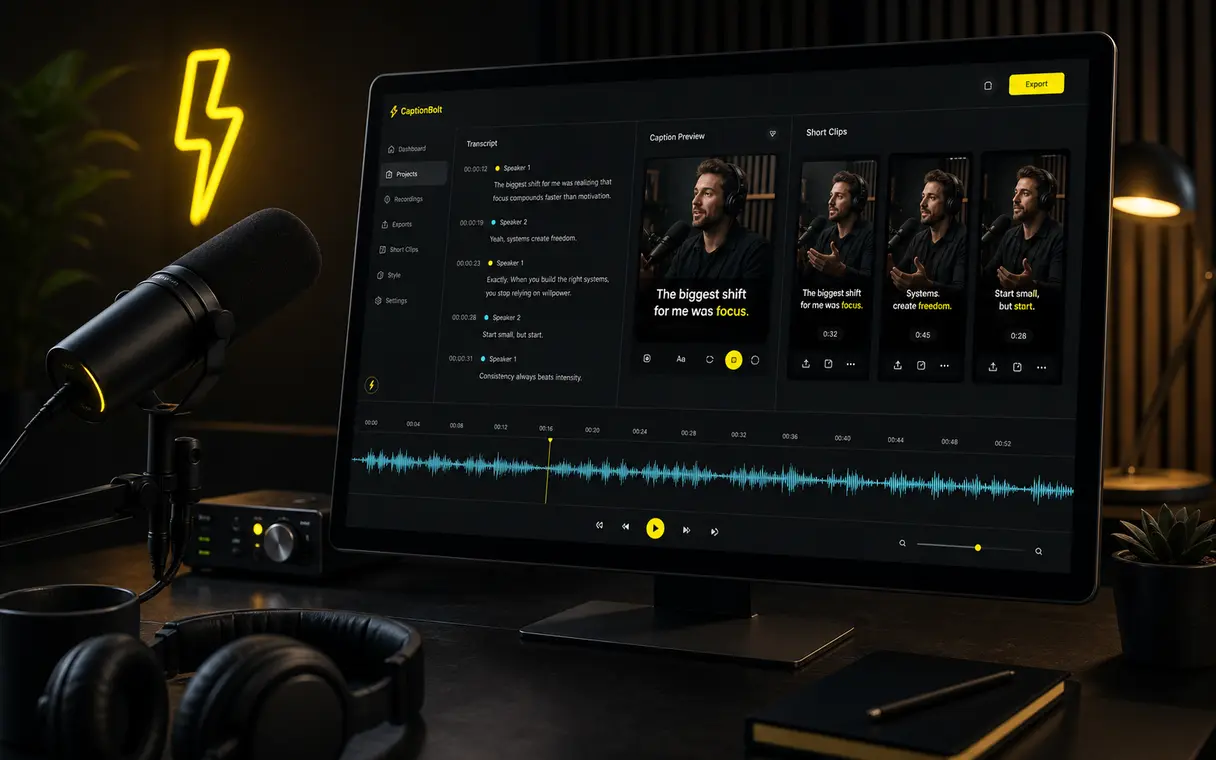
Podcast-Transkript bereit
Prüfen Sie Wörter neben der Aufnahme, springen Sie per Zeitstempel, suchen oder ersetzen Sie Text und laden Sie das Ergebnis in der Originalsprache herunter.
Für die chaotische Mitte gemacht
Lange Aufnahmen erzeugen zu viel Nacharbeit
Lange Aufnahmen nur durch Anhören zu prüfen kostet Zeit. Ein durchsuchbares Transkript hilft, Formulierungen zu kontrollieren und Stellen zu finden, ohne jede Minute erneut abzuspielen.
Eine ganze Folge erneut anhören, nur um eine Stelle zu bestätigen.
Eine lange Aufnahme von Hand abtippen, bevor der Text geprüft werden kann.
Eine bestimmte Passage finden, wenn nur eine Audio- oder Videozeitleiste verfügbar ist.
Korrekturen ordnen, bevor das Transkript für den nächsten Schritt heruntergeladen wird.
Podcast-Transkription für Creator
Prüfe und verwende dein Podcast-Transkript weiter
Aufnahme hochladen
Beginnen Sie mit einer Folge, einem Interview, Webinar, Video-Podcast oder einer anderen Aufnahme, die Sie verwenden dürfen.
Transkript erstellen
CaptionBolt erstellt einen bearbeitbaren Transkriptentwurf in der Originalsprache der Aufnahme.
Prüfen und bearbeiten
Korrigieren Sie Formulierungen, suchen oder ersetzen Sie Text und wählen Sie eine Passage, um zu ihrem Zeitstempel zu springen.
Lade das Transkript herunter
Laden Sie das geprüfte Transkript in den Dateiformaten herunter, die Ihr Tarif bietet.
Anwendungsfälle
Für Podcasts, Interviews, Webinare und Long-Form-Videos
Podcast-Transkripte
Prüfen oder archivieren Sie eine lesbare Fassung der Folge und behalten Sie die Quellaufnahme griffbereit.
Shownotes
Nutzen Sie das korrigierte Transkript als Quelle, während Sie eigene Shownotes, Kapitel oder eine Episodenseite verfassen.
Webinare und lange Videos
Durchsuchen Sie eine lange Aufnahme, finden Sie eine Passage und prüfen Sie den Wortlaut, ohne die gesamte Datei abzuspielen.
Ausgabevorschau
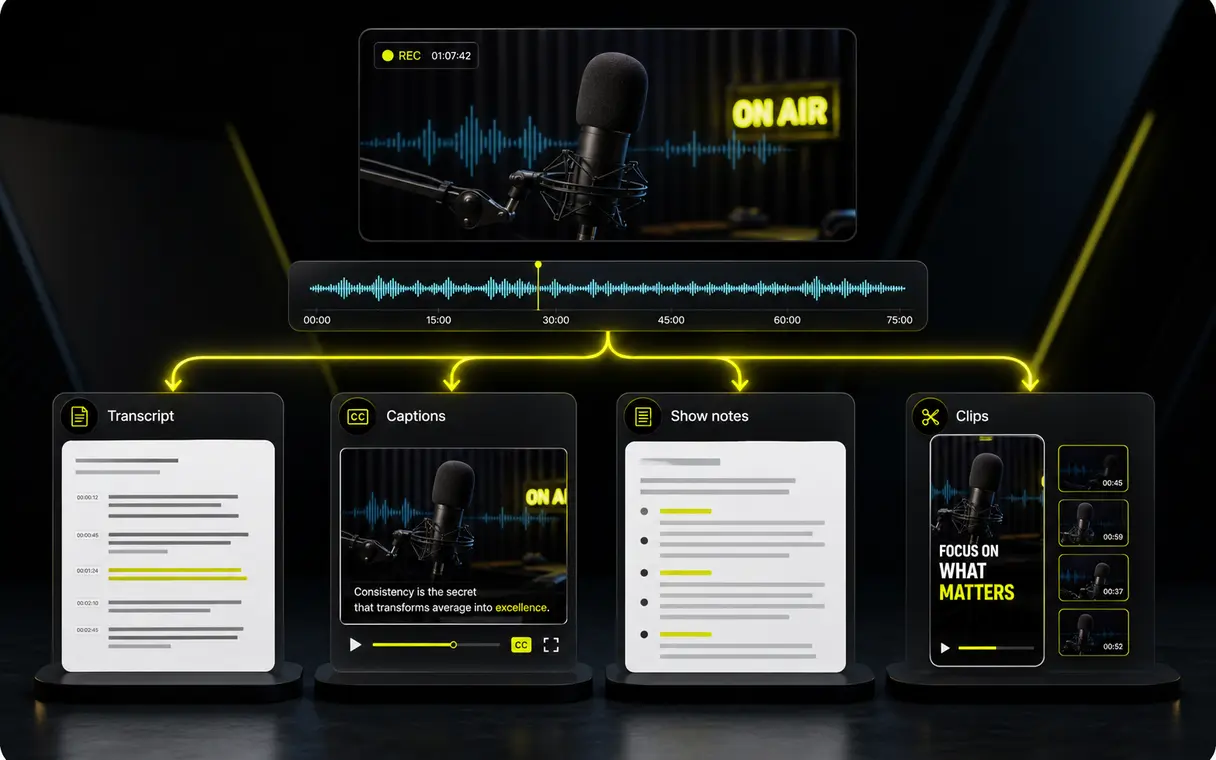
Nützlicher als eine reine Textwand
Der Text in der Originalsprache bleibt während der Prüfung mit der Aufnahme verbunden; anschließend laden Sie das korrigierte Ergebnis herunter.
Verwandte Workflows
Untertitel in einem separaten Videoprojekt hinzufügen
Der Transcript-Arbeitsbereich ist für bearbeitbaren Text gedacht. Verwenden Sie AI Captions, wenn gestaltete Untertitel mit einem Video gerendert werden sollen.
Kostenlos starten, keine Kreditkarte erforderlich
Podcast-Transkription ab $9/month
Laden Sie eine Aufnahme hoch, um ein prüfbares und herunterladbares Transkript in der Originalsprache zu erstellen.
FAQ
Fragen zur Podcast-Transkription
Wie genau ist das Transkript?
Die Genauigkeit hängt von der Aufnahme ab, darunter Hintergrundgeräusche, Akzente, überlappende Stimmen und Mikrofonqualität. Prüfen Sie den Entwurf, bevor Sie sich auf den exakten Wortlaut verlassen.
Kann ich Video-Podcasts und Interviews transkribieren?
Ja. CaptionBolt ist für hochgeladene Podcast-Aufnahmen, Video-Podcasts, Interviews, Webinare und Long-Form-Videos gedacht, die Ihnen gehören oder für deren Nutzung Sie die Erlaubnis haben.
Unterstützt CaptionBolt Sprachen außer Englisch?
Wählen Sie automatische Erkennung oder eine unterstützte Ausgangssprache. Das Transkript bleibt in der Originalsprache der Aufnahme und sollte vor der Nutzung geprüft werden.
Kann ich Transkripte oder Untertitel exportieren?
Sie können das geprüfte Transkript in der Originalsprache herunterladen. Die verfügbaren lokalen Dateiformate richten sich nach Ihrem aktuellen Tarif und werden im Arbeitsbereich angezeigt.
Gibt es ein kostenloses Kontingent?
Ja. Sie können kostenlos ohne Kreditkarte starten und CaptionBolt mit echten Inhalten testen. Aktuelle kostenlose Kontingente und Limits bezahlter Pläne werden im Produkt und auf der Preisseite angezeigt.
Erstellt der Transkript-Arbeitsbereich gestaltete Video-Untertitel?
Nein. Der Transcript-Arbeitsbereich endet mit bearbeitbarem Text und lokalen Downloads. Starten Sie ein separates AI Captions-Projekt, um gestaltete Untertitel im Video zu erstellen und zu exportieren.