Transcription d'interview pour les créateurs
Transcription d'interview pour les sous-titres, notes et clips
Transformez des enregistrements d’interview en brouillons de transcription propres, moments citables, sous-titres et clips forts pour les workflows contenu, recherche et vidéo.
Essayez avec une vraie interview
Importez un enregistrement d interview
Créez un compte gratuit pour transformer une interview en brouillon de transcription à relire, citer, sous-titrer ou découper en clip.
MP4, MOV, MP3, WAV, M4A
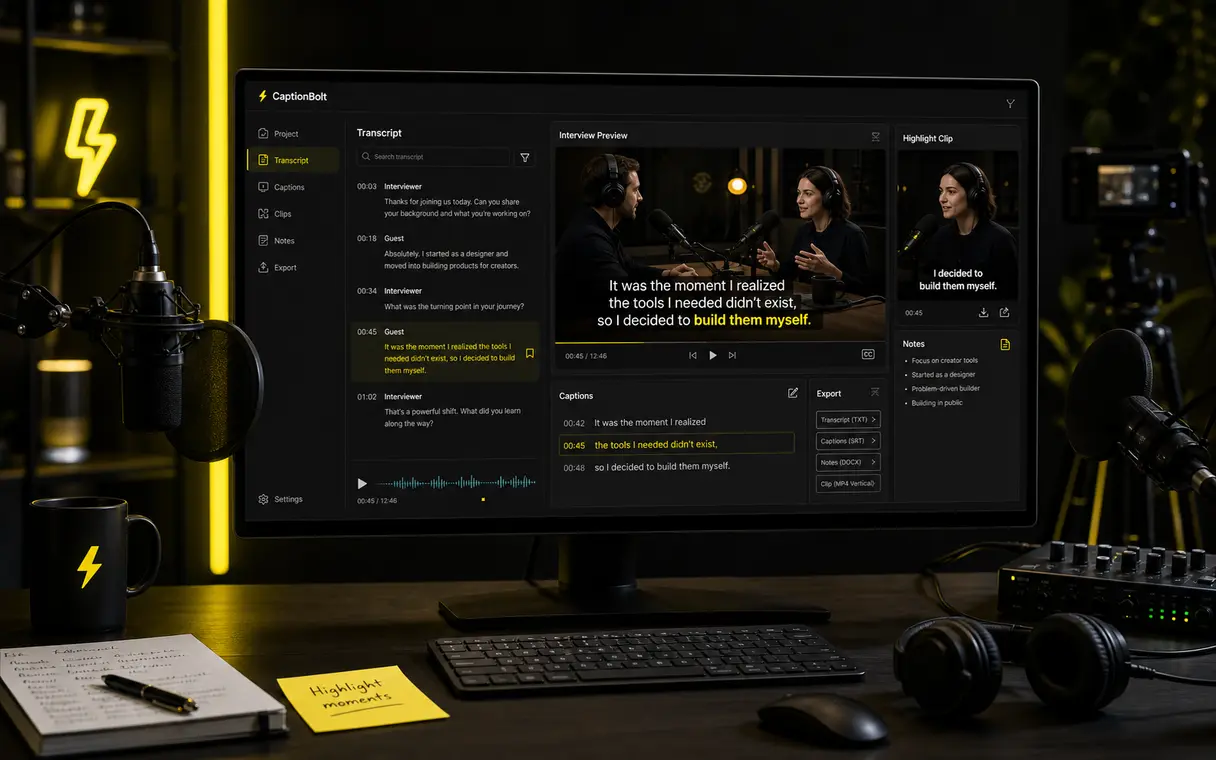
Transcription d'interview prête
Relisez la conversation, extrayez des citations, ajoutez des sous-titres et créez des clips.
Workflow rapide
De la conversation aux contenus d’interview réutilisables
Importez l'interview
Commencez avec une interview vidéo, une interview de podcast, un webinaire, un enregistrement de type réunion ou un fichier audio.
Obtenez une transcription
Créez un brouillon texte à relire pour le montage, les notes, les citations, les résumés et la planification de contenu.
Relisez et modifiez
Trouvez plus vite les moments clés, nettoyez le résultat et gardez le jugement humain dans le workflow.
Créez des sous-titres et des clips
Passez de la transcription d'interview à des moments forts sous-titrés et des exports de clips courts.
Cas d'utilisation
Pour les interviews qui demandent plus qu'un fichier texte
Interviews YouTube
Transformez de longues interviews vidéo en transcriptions consultables et en moments forts sous-titrés.
Interviews de podcast
Utilisez la transcription pour préparer des notes d'épisode, citations, pages d'épisode et clips.
Interviews clients
Relisez les conversations plus vite et extrayez des citations utiles pour le marketing et la recherche.
Webinaires et interventions d'experts
Transformez de longues discussions en notes, sous-titres et courtes ressources de moments forts.
Pourquoi la transcription d'interview ralentit les équipes
La transcription n'est que la première étape
Les équipes doivent encore relire la conversation, trouver les moments clés, transformer les citations en ressources et créer des moments forts sous-titrés.
La transcription manuelle prend trop de temps pour les interviews récurrentes.
Les citations importantes se perdent dans de longs enregistrements.
Sous-titrer les moments forts d'une interview après la transcription ajoute une étape.
Les équipes de recherche, de contenu et de vidéo ont besoin de résultats réutilisables.
Sortie du workflow
Des transcriptions reliées au reste de la production
Utilisez une transcription pour relire la conversation, extraire des citations, préparer les sous-titres et choisir les moments à clipper.
Transcription + sous-titres + clips
Relisez la conversation avant de la transformer en contenus.
Transcription
Sous-titres
Clips
Flux liés
Transformez les interviews en sous-titres, notes et clips
Utilisez ces pages quand une transcription d’interview doit devenir du contenu réutilisable.
Générateur vidéo en transcription pour créateurs
Utilisez la transcription vidéo quand l’interview a besoin d’un texte propre avant les sous-titres, notes ou clips.
Éditeur de sous-titres en ligne gratuit
Modifiez les fichiers SRT ou VTT après avoir transformé la transcription d’interview en sous-titres synchronisés.
Générateur de sous-titres automatique pour vidéos
Générez des sous-titres pour les extraits d’interview une fois la transcription et le clip prêts.
Transformez de longues vidéos en clips courts sous-titrés
Utilisez ce workflow quand une longue interview doit aussi devenir des clips courts pour les réseaux sociaux.
Commencez gratuitement. Plans dès $9/mois.
Transcrivez votre prochaine interview plus vite
Importez une interview et passez de la transcription aux sous-titres, citations et moments prêts à clipper.
FAQ
Questions fréquentes
Puis-je transcrire des interviews audio et vidéo ?
Oui. CaptionBolt est conçu pour les workflows audio et vidéo importés, y compris les enregistrements d'interview et les interviews vidéo.
Prend-il en charge plusieurs intervenants ?
CaptionBolt est utile pour les contenus d'interview à plusieurs personnes, mais la qualité du résultat dépend de la clarté audio, du chevauchement des voix, du bruit de fond et des conditions d'enregistrement.
Quelle est la précision de la transcription ?
La précision varie selon la qualité audio, les accents, le bruit de fond et les chevauchements de voix. CaptionBolt est conçu pour créer plus vite une base solide, avec la possibilité d'une relecture humaine.
Puis-je transformer l'interview en sous-titres et en clips ?
Oui. Le workflow continue au-delà de la transcription vers les sous-titres et la création de clips courts pour réutiliser le contenu d'interview.