
01
AI captions
Generate captions
CaptionBolt transcribes the speech, times every line, and applies a caption style. Review the words and make the look your own.
From recording to ready to post
CaptionBolt generates styled AI captions, then helps you resize, trim, add B-Roll and branding, create a cover, and prepare social copy—all without a complicated editor.
No credit card required · 10 processing minutes free each month · all 338 caption styles
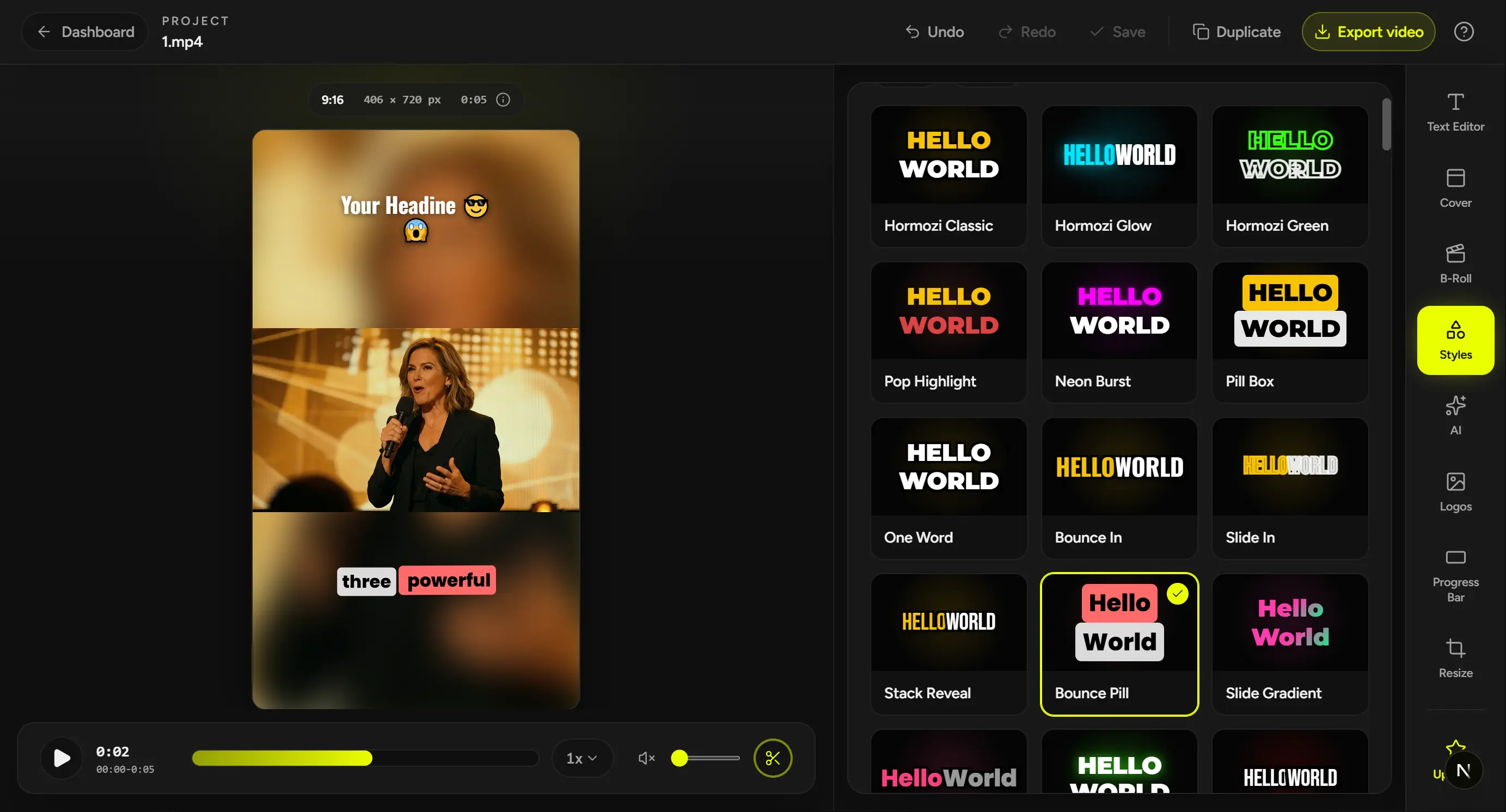
338 caption styles
A style for every video
Resize
TikTok, YouTube, Instagram, and more
Smart B-Roll
AI suggestions, stock, or your own media
A shorter path to publish
CaptionBolt generates styled AI captions first, then keeps the final review simple: check the words, choose the format, and remove anything you do not want to publish.
AI captions
CaptionBolt transcribes the speech, times every line, and applies a caption style. Review the words and make the look your own.
Resize
Keep the original frame or resize for TikTok, Reels, Shorts, square posts, and widescreen video.
Final review
Preview the video, trim an unwanted beginning or ending, and export the cut you are ready to share.
One upload. One focused review. One finished video.
Finish a video freeThe live style catalog
Explore a curated preview from 338 styles across six distinct families. See selected styles in motion, then adjust the font, color, placement, and emphasis in the editor.
Everything after captions
Build a cover, add B-Roll and branding, and prepare the post—without moving the video between tools.
Cover
Choose from 24 designs and generate editable headline options in six tones, then refine the copy and design.
Explore Cover and headlinesSmart B-Roll
Use transcript-matched suggestions, search Pexels, or upload your own media, then adjust the timing and layout.
Explore Smart B-RollBrand tools
Save your caption style, canvas, Logo, and Progress Bar in a video preset, then explicitly apply the look to the next video.
Explore Video presetsSocial posts
Generate editable copy for TikTok, Instagram Reels, and YouTube Shorts, then export the video and files your plan includes.
Explore Social postsOptional AI actions do not deduct extra minutes from your processing allowance. Fair-use request limits protect reliability, and every result stays editable.
When video is part of the work
For creators and small teams, video supports the real work—teaching, selling, building trust, and keeping a brand visible. CaptionBolt keeps the finishing work focused, so post-production does not become another job.
Finish lessons, demos, insights, and updates with polished captions and a clear final presentation—without living inside a timeline editor.
Keep interviews, campaigns, product demos, and client updates moving with a repeatable look instead of rebuilding the same finishing work every time.
The same creative workflow on every plan
Start free with all 338 caption styles and the CaptionBolt finishing workflow. When you publish more, choose the processing capacity and export options that fit your workload.
Start free. Paid plans from $9/month.
Find the right planFrom AI Captions and text review to Resize, Cover, Smart B-Roll, brand tools, and Social posts, the creative workflow is available on every plan.
Plans differ by processing minutes, upload limits, watermark, output resolution, subtitle formats, queue priority, and concurrent processing.
Before your first upload
CaptionBolt handles the first pass. You can review the words, framing, and every optional finishing choice before you export.
Your next video
Upload the footage, generate styled AI captions, add the finishing touches, and export a video ready to publish.
We use cookies to remember preferences, measure site performance, and improve CaptionBolt.


